
Pixilart - Make Pixel Art
PixilartArt & Design
4.11.47K Reviews
- Version
- 1.9.0
- Installs
- 1.00M
- Age Rating
- Teen
Screenshots
Our Review of Pixilart - Make Pixel Art
 Analysis by Appyee
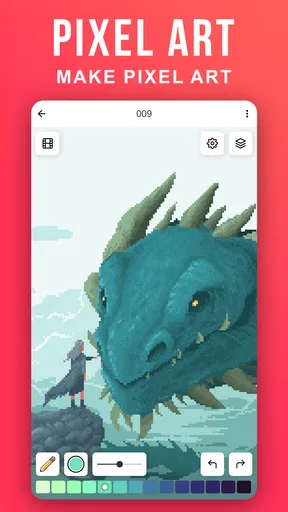
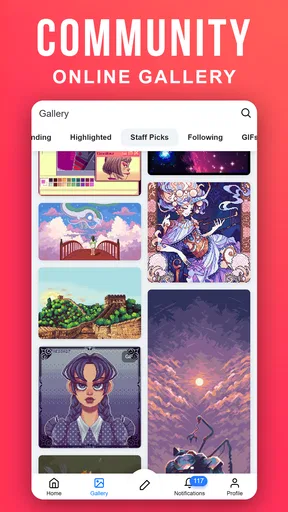
I spent time with Pixilart as a pixel-drawing app and found that its most interesting quality is not simply the act of placing colored squares. It turns that drawing process into a shared creative space. You can work on small pixel images, look at what other people make, and treat the app as both a sketchbook and a social platform. That combination gives it a different feel from a private pixel editor.
Pixilart is a free Art & Design app from Pixilart, aimed at anyone who enjoys creating pixel art or browsing it. It has a Teen content rating, runs on devices using Android 10 or later, and its current version is 1.9.0. The app was released on November 5, 2018, and its popularity is reflected in more than a million installs, with an average rating of 4.1 from roughly eleven thousand ratings.
My overall impression is positive, especially for beginners who want motivation rather than a completely isolated drawing tool. The social side can make a tiny image feel like part of a larger hobby. At the same time, that same social focus may distract people who only want a fast, silent editor for professional production work.
Why the shared pixel-art capability matters
The central capability here is the connection between pixel drawing and community discovery. In a conventional drawing app, I open a blank canvas, make an image, save it, and move on. Pixilart gives that process a wider context: the artwork can be viewed alongside work from other creators, which changes how I approach even a simple experiment.
Pixel art benefits from this kind of focused environment because the format is easy to understand but difficult to master. A small canvas forces decisions about shape, contrast, spacing, and color. Seeing other pixel images helps me notice choices I might otherwise miss, such as how a single dark square can define a face or how a limited palette can make an object more recognizable.
The real strength is the feedback loop between making and observing. I can try a small drawing, compare its visual language with work in the community, and return to my own canvas with a clearer idea of what needs improvement. That is more useful than an app that only provides tools without any creative reference around them.
This also makes the app approachable for people who feel intimidated by larger art programs. A full illustration suite can present layers, brushes, effects, export settings, and many other choices before a beginner has even drawn a line. Pixilart’s identity is narrower. It keeps the focus on pixel-based images and the culture around them, which lowers the mental barrier for a first attempt.
How the drawing experience works in practice
When I use a pixel-art app, I am not looking for natural brush movement. I want precision. Each mark should land where I intend, and the image should remain readable when built from a small number of deliberate blocks. Pixilart is best understood through that mindset: it is a place for controlled, incremental construction rather than loose painting.
My preferred workflow is to begin with a very simple subject instead of trying to create a detailed scene immediately. A small icon, character face, food item, or object gives me a clear silhouette to solve first. After that, I can add internal details and adjust the colors. This approach works particularly well in a social app because a finished, readable idea is more satisfying to share than an ambitious canvas that never comes together.
One useful habit is to treat every color as a job rather than choosing shades at random. I use one tone for the main body, another for separation, and a lighter tone only where it improves form. Pixel art can become muddy when too many similar colors are added. Working with restraint makes the result easier to read and also makes revisions less frustrating.
Another practical tip is to zoom in for placement but regularly check the image at its natural viewing size. Close-up work can make tiny details feel important even when they disappear in the finished picture. The social setting encourages this discipline because an image has to communicate quickly when someone is browsing a collection of artwork.
The community element is also useful as a learning tool, but I would not treat every popular-looking image as a lesson to copy. I get more value by asking why a piece works. Is the outline doing too much? Is the focal point clear? Does the palette create enough separation? Those questions turn browsing into practice instead of passive scrolling.
A realistic everyday use case
Imagine having fifteen minutes during a commute, a lunch break, or a quiet evening. Pixilart suits a small creative challenge: draw a familiar object using only a few colors, then refine its silhouette and details. The limited scope makes it possible to finish something instead of opening a large project that demands an uninterrupted hour.
For a beginner, I would suggest creating a themed set over several short sessions. One day could be a tiny plant, the next a cup, and another a simple animal. Keeping the subjects modest teaches consistency in proportions and color choices. The social side then gives the project a sense of continuity, even if each individual image is small.
For a more experienced artist, the same scenario can become a warm-up. Rather than starting with a complex character sheet, I can use a compact image to test a palette or explore a pose. The app is especially appealing when I want to think in pixels from the beginning instead of drawing at a large size and reducing the image later.
It can also work for parents or teachers looking for a creative activity with a clear visual outcome, although the Teen rating means it should be considered in light of the intended user’s age. The important point is that the app is not just a blank canvas; the surrounding platform can give a learner examples and motivation. That benefit depends on using the community thoughtfully rather than treating it as endless entertainment.
Where it differs from ordinary drawing alternatives
Compared with a general illustration app, Pixilart offers a more focused identity. A broad drawing program is usually the better choice when I need smooth brushwork, detailed painting, typography, photo manipulation, or a flexible professional workflow. Those tools can support many styles, while Pixilart is centered on the particular discipline of pixel images.
Compared with a private pixel editor, Pixilart feels more outward-facing. A standalone editor may be preferable when I want to work offline, avoid community browsing, or keep every step centered on a personal project. Pixilart makes more sense when discovery and participation are part of the appeal.
There is also a difference in motivation. A private tool can be calming because nothing competes for attention. Pixilart can be energizing because other artwork gives me ideas and a reason to return. The trade-off is that inspiration can become comparison. If I am already prone to judging an unfinished sketch against polished work, the social environment may make experimentation feel less relaxed.
I would not choose this app as my only tool for a serious production pipeline without testing the workflow carefully. Pixel art for a game, a commercial asset set, or a large collection often requires consistent naming, repeatable export routines, and careful project organization. Pixilart’s strongest identity is creative making and sharing, not replacing every specialized desktop workflow.
The trade-offs behind the social approach
The biggest advantage and the biggest limitation come from the same source. Community access makes the app feel alive, but it means I am not using a purely focused editor. Someone who opens the app with a precise task may find the surrounding discovery experience less direct than a minimal drawing utility.
There is also a learning curve that has little to do with buttons. Pixel art looks simple because the images are small, yet small canvases expose mistakes. A misplaced outline or poorly chosen contrast can change the expression of a character. Beginners should expect to undo, redraw, and simplify. The app can make practice inviting, but it cannot remove the design decisions that make pixel art challenging.
Touch input introduces another practical consideration. On a phone, tiny controls and small canvases can feel cramped, especially when I am trying to place a single pixel accurately. A larger screen or a careful zooming routine can improve the experience. I would be cautious about choosing it for highly precise work if my main device has a small display or if I strongly prefer mouse-and-keyboard control.
The Teen content rating is worth taking seriously for families. Pixilart is presented as a platform for everyone, but a social creative space still deserves the same awareness I would apply to any community-based app. Younger users should use it in an age-appropriate way, and adults should decide whether the combination of public creativity and browsing suits their household.
The rating of 4.1, supported by about one and a half thousand written reviews, suggests a generally favorable reception with room for individual differences in experience. I read that as a sensible signal rather than a guarantee. People who want pixel art plus community are likely to understand the app quickly; people seeking a polished all-purpose art studio may judge it by standards it was never designed to meet.
Small workflows that make the app more useful
My first recommendation is to separate exploration from production. I browse for ideas before opening a canvas, then stop browsing once I begin drawing. This prevents the social feed from breaking my concentration and gives the community a useful role without allowing it to take over the session.
Second, I would build a personal palette habit. Even if I am only making casual images, reusing a small group of colors across several drawings creates visual consistency. It also makes it easier to identify which part of an image is failing: the shape, the contrast, or the palette. This is a more productive way to improve than adding detail whenever a drawing feels weak.
Third, I would make a duplicate-style practice routine in my head without copying another artist’s finished work. I can study a piece for one idea, such as its outline or shadow placement, close it, and then create a different subject using the same principle. That turns browsing into an exercise and helps preserve my own style.
Finally, I would finish more often than I restart. Pixel art rewards completion because the final image reveals whether the silhouette and contrast work together. A collection of small finished studies teaches me more than one oversized project abandoned after the first difficult section.
Who will gain the most from it
Pixilart is a strong match for beginners who want structure, inspiration, and a reason to keep practicing. It is also appealing to hobby artists who enjoy making compact images, discovering other pixel work, and sharing the results in a dedicated environment. The free price removes an obvious barrier, so trying it does not require committing to a paid art suite.
It can suit students of pixel-art fundamentals, casual creators looking for a short creative break, and experienced artists who want a lightweight place to explore ideas. The app’s focus is valuable here: I am less likely to drift into unrelated illustration techniques when the visual language stays centered on pixels.
I would recommend skipping it if the main goal is advanced painting, photo editing, vector design, or a private offline workspace with no social dimension. I would also look elsewhere if precise desktop production is more important than community discovery. A specialized editor may offer a cleaner fit for that kind of work, while a general art app may be better for mixed media.
For anyone deciding whether to try it, the question is simple: do you want only a pixel canvas, or do you want a pixel-art place to visit? If the answer is the second option, Pixilart has a clear reason to exist. Its current version, 1.9.0, keeps the experience tied to that focused concept rather than trying to become every kind of art software at once.
My final recommendation
I recommend Pixilart to readers who see pixel art as both a creative technique and a community hobby. I enjoyed the way a small drawing could lead naturally to observation, comparison, and another attempt. That cycle makes the app more engaging than a blank editor for many casual users.
It is not perfect for every artist. The social setting can distract, touch-based precision can require patience, and the focused pixel format will feel restrictive if you want broad illustration tools. Still, those limits are closely connected to its identity rather than signs that it lacks direction.
At no cost, with over a million installs and a Teen rating, it is easy to understand why the app attracts a wide audience. My advice is to begin with a deliberately tiny project, use the community as a source of techniques rather than a scoreboard, and judge the experience after finishing a few images. If that process feels motivating, this is a welcoming way to make pixel art and keep learning.
Verdict
Strengths of Pixilart - Make Pixel Art
- Simple pixel-art tools are easy for beginners to understand.
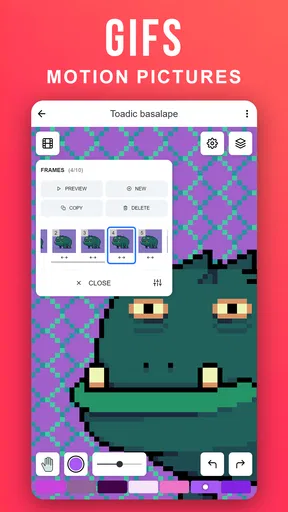
- Supports animation, making it useful for creating moving sprites.
- Community galleries provide inspiration and feedback from other artists.
- Works well for designing game assets, icons, and small illustrations.
- Cloud-based profiles let you access saved artwork across supported devices.
Limitations of Pixilart - Make Pixel Art
- Some advanced tools and features may require a premium subscription.
- The small drawing canvas can feel restrictive for detailed artwork.
- Community content quality varies, so finding useful feedback takes time.
- An internet connection may be needed for social and cloud features.
- Ads or upgrade prompts can interrupt the experience for free users.
Similar Picks in This Category
View All
Canva: AI Photo & Video Editor
Canva4.8

PENUP – Drawing-sharing SNS
Samsung Electronics Co., Ltd.4.5

Crafto
Kutumb App4.6

Sketchbook
Sketchbook4.1

ibis Paint X
ibis inc.4.5

Adobe Express: AI Photo, Video
Adobe4.6
Frequently Asked Questions
What is Pixilart - Make Pixel Art, and who is it designed for?
Pixilart - Make Pixel Art is a mobile drawing app focused on creating pixel-based artwork, sprites, icons, animations, and game-inspired designs. It is suitable for beginners who want a simple way to experiment with pixels, as well as more experienced artists looking for dedicated editing tools. The app also appeals to retro-gaming fans and creators who enjoy sharing their work with an online pixel-art community.
What tools are available for creating pixel art in Pixilart?
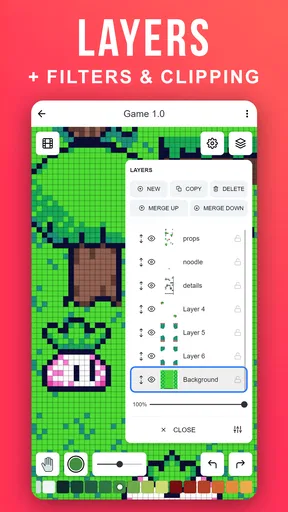
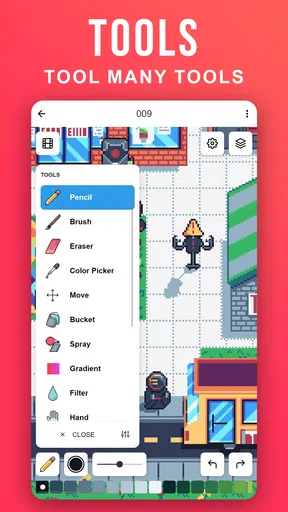
Pixilart includes the essential tools needed for pixel drawing, such as pencils, erasers, color palettes, fill options, shape tools, and canvas controls. Depending on the project, users can work with layers, frames, and animation features to create more detailed artwork or moving sprites. The interface is designed around precise pixel placement, although new users may need a little practice to become comfortable with the controls on a phone screen.
Can I create animations and game sprites with Pixilart?
Yes, Pixilart can be used to create animated pixel art and sprite-style graphics. Users can build artwork frame by frame, making it useful for simple character movements, effects, and short looping animations. It is not a complete game-development engine, so the finished artwork may need to be exported and used in another program or game project. Still, it provides a convenient starting point for designing retro-style visual assets.
Can I share my artwork or interact with other Pixilart users?
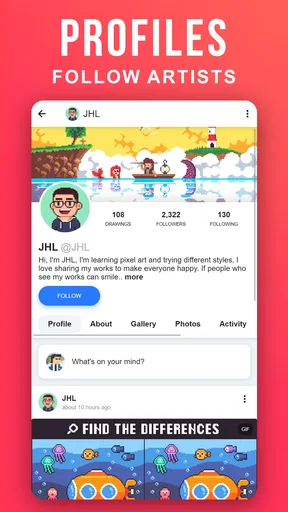
Pixilart is more than an offline drawing tool because it includes community-oriented features for publishing and discovering pixel art. Depending on the current version and account options, users may be able to share creations, follow artists, participate in challenges, and receive feedback. These social features can be motivating, especially for beginners, but users should review privacy settings and avoid sharing personal information publicly.
Is Pixilart free to download, and are there any limitations?
Pixilart can generally be downloaded and used without an upfront purchase, but some features may depend on advertisements, optional upgrades, account requirements, or platform-specific restrictions. The available tools and export options can also change as the app is updated. Before starting a major project, it is worth checking the current store listing and in-app details so you understand whether any premium features or limitations apply.
